Contents
- What is Government ID
- How the Government ID process works
- Objection handling
- Government ID escalation process
- Fraud and the role you play
What is Government ID?
If the Multi-factor authentication process did not work or the process is unable to be completed, then customers can authenticate using the Government ID process.
The Government ID process involves the customer submitting Government issued identification documents online to a third party called greenID. greenID will authenticate the customer using information provided by them. Once completed the customer will have to contact Foxtel back to obtain the results of the check. If successful, they are considered authenticated and can continue with their enquiry.
Who manages the Government ID process?
The Government ID process is managed differently depending on how you are interacting with your customer.
If you interact with your customer via:
- Phone: You will need to transfer the customer to the Identification specialist team found in your Amazon quick connects
- Chat/Messenger: Managed by the agent with the ability to send the link to the customer via email or SMS.
How the Government ID process works
-
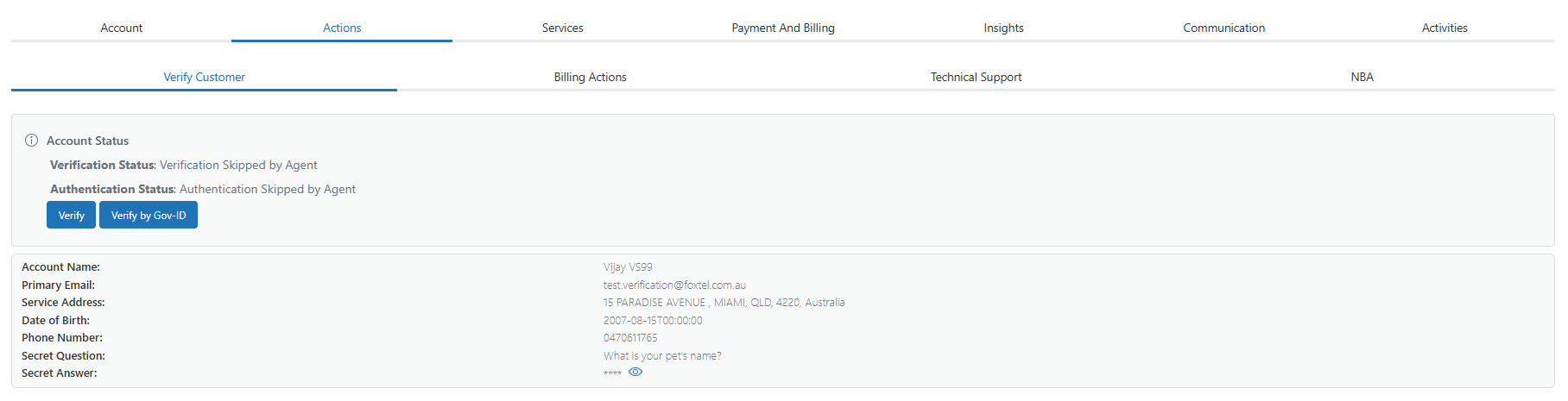
Navigate to the Actions tab, then under Verify Customer click Verify by Gov ID.
-
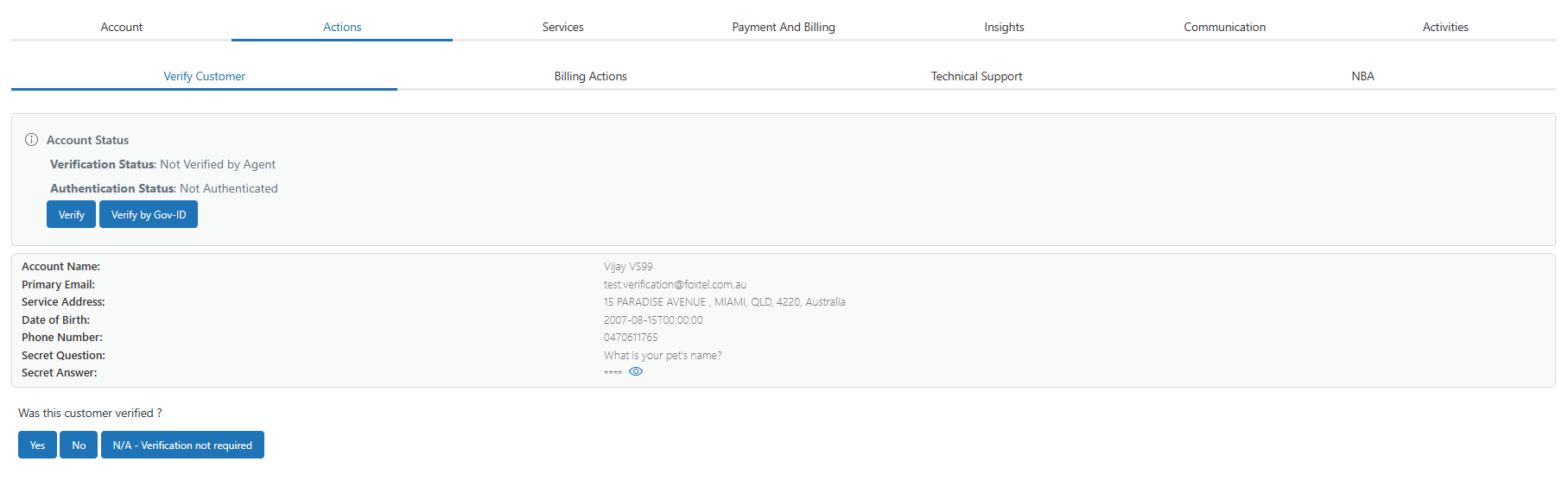
Zendesk will ask if you have verified the customer already before starting the GovID process. To proceed with the Government ID process, select Yes.
-
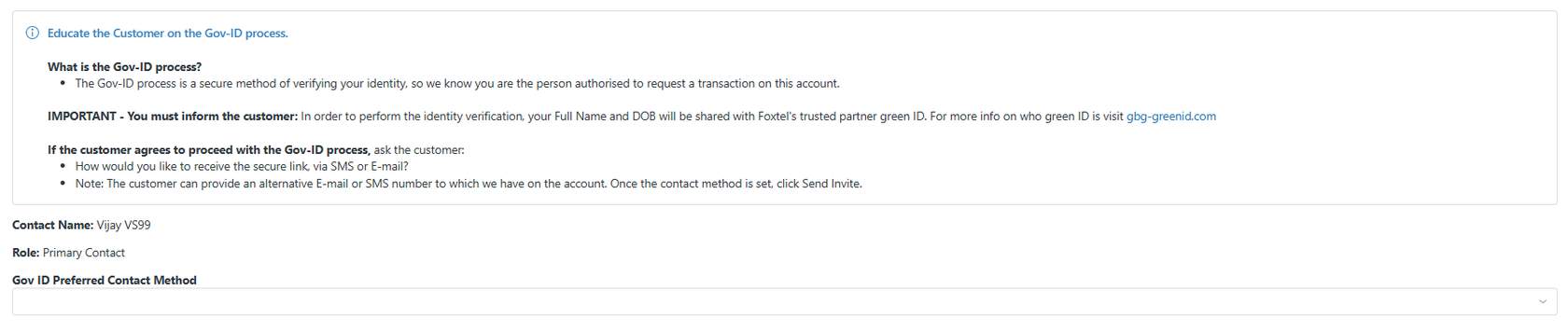
You will see a set of instructions you will need to check with the customer about completing the process. Before proceeding, ensure the customer is aware of these.
-
Confirm with the customer how they would like to receive their Government ID link. This can be done by email or SMS.
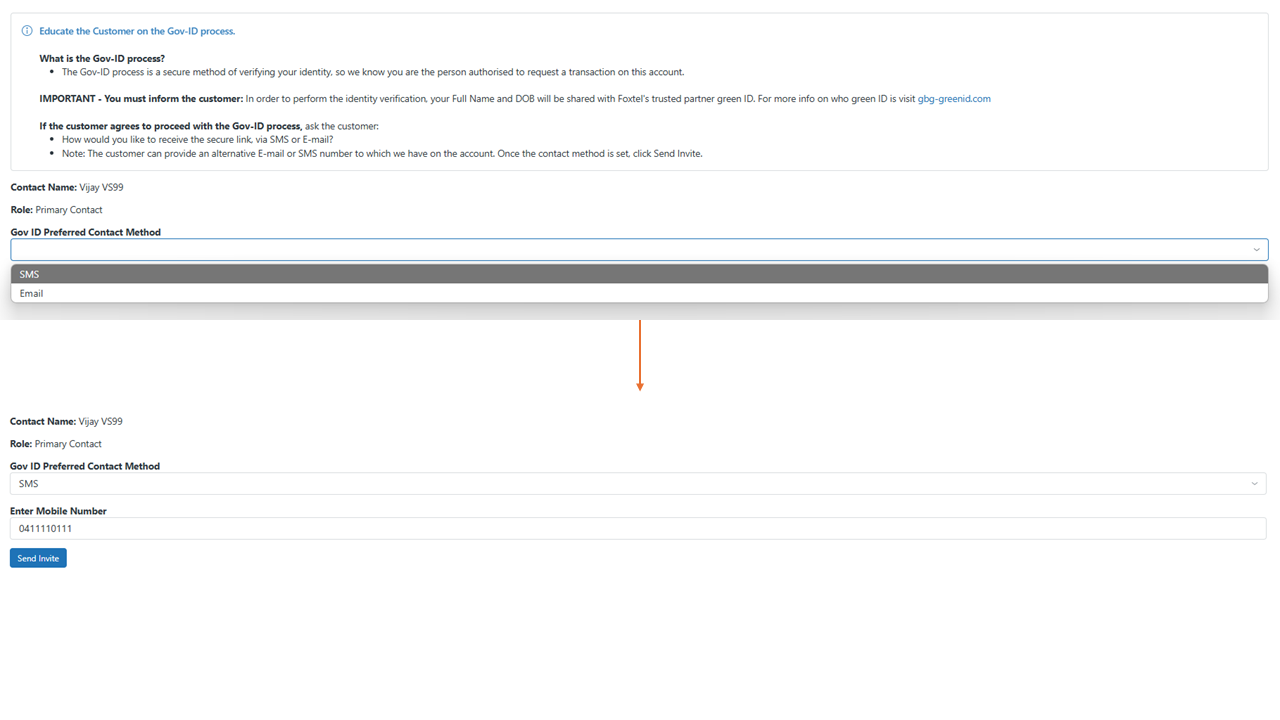
- Click here for a copy of the messaging the customer will receive as a part of this process.
-
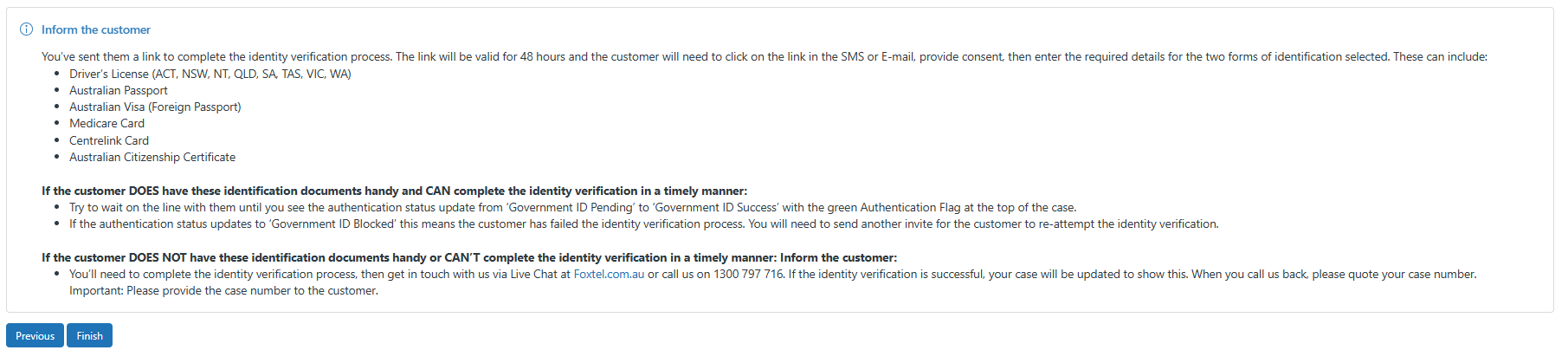
Once the customer's information has been finalised, you will see the below information appear, including a list of expectations you need to set with the customer.
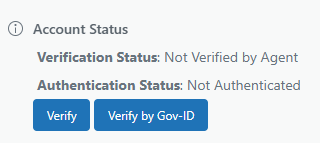
- To see the outcome of the Government ID information, the Account status screen will update under Verify customer.
Customer message
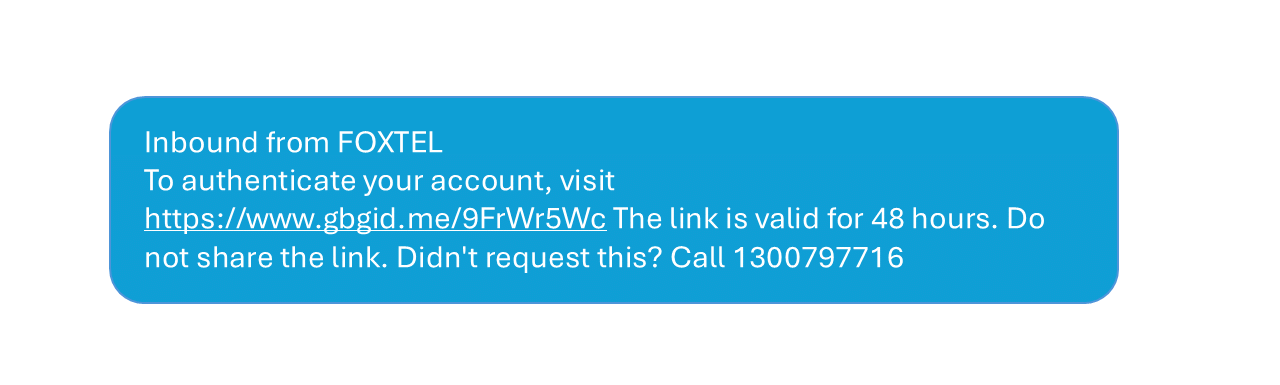
Customers who have preferred to receive the GovID link via SMS will see the below message. Customers will just have to follow the link to validate their ID using the available methods.
Alternate Government ID escalations
If a customer did not initiate MFA or advises of security concerns associated to multi-factor authentication, you must escalate a complaint to our executive and regulatory complaints team. Select the executive and regulatory complaint queue with your complaint case.
Ensure you discuss any advised objections with your team leader to ensure you can work towards the best outcome for your customer on the interaction are managing.
What happens next?
Once the interaction is finished the customer will access the link that has been sent and follow the prompts. They will then need to contact us within 24 hours of completing the process to obtain the result of the greenID check.
Note: The link is valid for 48 hours once sent however will have 24 hours to receive their result once registering their documents through greenID.
What happens when a customer calls us back within 24 hours?
- The customer will be routed directly to the specialist ID team upon calling back
- A new Service case will be opened for the agent receiving the call
- The agent will head to the previous case to check the result
- If the result is successful the agent will grab the customers new mobile phone number from the notes (if applicable), then return to the newest service case (from step 2)
- The agent will update the customers contact record to include the mobile phone number
- After updating the phone number, agent needs to launch the Verify Customer flow on the new Service case and authenticate the customer using OTP process.
What if the Government ID process fails
If the customer submits their details and the result is unsuccessful, that means that they were not able to be authenticated, and we cannot proceed with their enquiry by law. This may result in a complaint needing to be submitted.
Note:
- The Government ID process invitation can be re-sent to the customer if they’d like to try again.
- The greenID portal will allow for nicknames to be used (i.e. Customer is called Robert however greenID will accept Rob)
Objection Handling
There may be some circumstances where customers may object to the Government ID process:
1. If the customer is upset that the Gov ID process was difficult
- Whether the gov ID process was successful or not, a customer may be unhappy about how it went - it's important to show empathy.
- It's also a good idea to set up the customer for future MFA success by ensuring we have their correct mobile phone number on file for next time.
- If the gov ID process fails, we will not be able to proceed with the customer's enquiry.
- While we don't want to turn away a customer that needs help, we cannot proceed by law if the customer has Broadband/Home Phone and are not authenticated by MFA or via the gov ID process.
- Particularly with the rise of cybersecurity and privacy issues around the world, it's understandable that a customer may be unsure about the gov ID process and having their information sent to an unfamiliar third party.
- It's important to reassure the customer and advise them that a form of authentication must occur for us to help them.
Note: In all cases, a complaint should be arranged if the customer makes a clear objection and asks to speak to a manager or higher about their experience.
Government ID escalation process (Note: Specialist ID and Online Chat Only)
What is the Government ID Escalation Process
When a customer does not meet the required documentation for GreenID or has failed the GreenID process, DO NOT ADVISE THEM TO CALL GREENID DIRECTLY. Advise the customer we will need to hand this over to our Regulation Team who manually assess their case.
Advise the customer we will need to gather some information (outlined below), and that the customer can expect a call back within 2 business days.
Complete the email template below and ensure we update the Service Case with the actions taken.
Subject: COAH Gov-ID Investigation
- Customers Full name (that appear on their ID):
- Foxtel Account number:
- Best Contact Number:
- Detailed reason why the Gov-ID process has failed?
Detailed reason examples
- Customer doesn’t have an Australian passport or Medicare card and GreenID will not accept their ID provided.
- Customers full name is Abigail, however the name on their Foxtel account is Abby and GreenID will not accept their ID as it does not match.
Fraud and the role you play
Fraudulent behaviour affects our customers and the business. When fraud goes undetected, it can have lasting financial, personal and legal impacts. Scams over telecommunications networks are a significant problem at a historically high level, causing financial and emotional harm to victims.
Scammers are increasingly sophisticated and find new, hard to detect ways of targeting business processes and technologies to perpetrate fraud on and through telecommunications services. Often scammers’ methods involve the fraudulent collection of personal information and data to commit identity fraud. Scammers adapt to technology quickly, build knowledge of customers and companies, and are opportunistic of events and crises.
While Multi-Factor Authentication is one measure to help keep customers safe in the event of fraud, it's important for agents to keep an eye out for potentially fraudulent behaviour too. This means being alert and aware during your interactions, and always reporting if something doesn't seem right. Have a curious mindset and ask customers questions if you want to clarify something.
You may proactively notice something out of the ordinary, or a customer may report suspicious activity to you. Even if it turns out to be nothing, it's better to ask questions and report things that are of concern. You can do this by emailing SRT@foxtel.com.au with account information and a summary of the issue, or by escalating the interaction to your leader in real time who can assess the situation.
We all need to work together to keep our customers and the business safe.
View the Multi-factor authenticate process: Overview - Multi-Factor Authentication