1. About CORE work order statuses
2. Work order status - normal
3. Work order status - stalled
4. Work order status - locked
2. Work order status - normal
3. Work order status - stalled
4. Work order status - locked
1. About CORE work order statuses
When an order (e.g. upgrade/downgrade package, upgrade equipment) is raised in CORE it progresses through different processes until it is complete, the work order status lets you know which process the order is up to.
Why is it important to understand a work order status?
If a customer requests a change to their account that requires an order to be raised, that change will not come into effect until the order is complete.
Depending on the type of order (e.g. connection, change, disconnection) there are different conditions that sometimes must be met before the order can progress to completion so the changes will happen.
Sometimes the work order can get stuck in a certain work order status and may require extra intervention before it can complete. This can be done by the Technical Support Team (TST) or the Viva Support Team (VST) using tools like Work List Handler or by logging a Service Portal ticket to fix it. We call these orders "stalled orders".
Where can I find the work order status?
When an order (e.g. upgrade/downgrade package, upgrade equipment) is raised in CORE it progresses through different processes until it is complete, the work order status lets you know which process the order is up to.
Why is it important to understand a work order status?
If a customer requests a change to their account that requires an order to be raised, that change will not come into effect until the order is complete.
Depending on the type of order (e.g. connection, change, disconnection) there are different conditions that sometimes must be met before the order can progress to completion so the changes will happen.
Sometimes the work order can get stuck in a certain work order status and may require extra intervention before it can complete. This can be done by the Technical Support Team (TST) or the Viva Support Team (VST) using tools like Work List Handler or by logging a Service Portal ticket to fix it. We call these orders "stalled orders".
Where can I find the work order status?
- Click on the Orders button on the Account Summary screen.
- On the left hand side of the Order screen, select the order you want to view the status of.
- On the right hand side of the Order screen, scroll to the service level of the order to see the current status. The service level of the order will contain the package and equipment.
Top
2. Work order status - normal
2.1 Waiting for Telstra Update
2.1 Waiting for Telstra Update
This type of work order status occurs when a customer has a bundled service and we are waiting for an update from Telstra Wholesale.
When will the order complete?
The order will not complete until the update has come from Telstra Wholesale.
Top
3. Work order status - stalled
3.1 Change_inventorynetwork
3.2 Change_servicenetwork
3.3 Connect Network Message
3.4 ServiceMove_conn
3.5 Replace the Inventory placeholders
3.6 SOC - Subprocess - Fix SOC
3.2 Change_servicenetwork
3.3 Connect Network Message
3.4 ServiceMove_conn
3.5 Replace the Inventory placeholders
3.6 SOC - Subprocess - Fix SOC
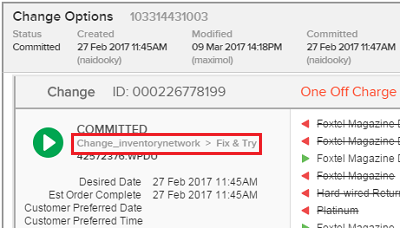
3.1 Change_inventorynetwork
This work order status applies to orders where the customer has requested an inventory change, for example an upgrade to an iQ3 or a DIY swap. This is a stalled order.
What needs to be done?
VST will need to intervene and fix it. For transfer information, see FoxPages directory - general information and specialist support.
What is the impact if it's not fixed?
The customer will not be able to use or view any channels on their new STB.
3.2 Change_servicenetwork
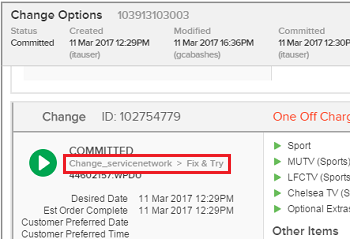
This work order status applies to orders where a customer has requested a change to their service, such as adding the Sports package. This is a stalled order.
What needs to be done?
VST will need to intervene and fix it. For transfer information, see FoxPages directory - general information and specialist support.
What is the impact if it's not fixed?
The customer will not be able to view the channels they have asked to upgrade to or may continue to be charged for a package they no longer wish to subscribe to.
3.3 Connect Network Message
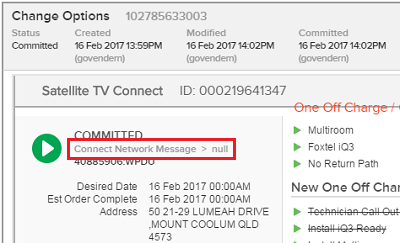
This work order status applies to orders where the customer is connecting a set top unit, for example adding a multiroom or a new customer connection. This is a stalled order.
What needs to be done?
VST will need to intervene and fix it. For transfer information, see FoxPages directory - general information and specialist support.
What is the impact if it's not fixed?
The customer will not be able to use or view channels on their new iQ3 multiroom.
3.4 ServiceMove_conn
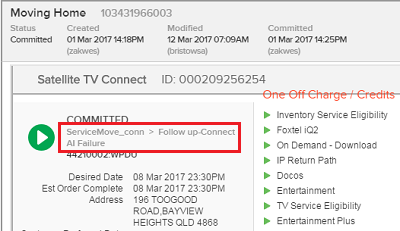
ServiceMove_conn > Follow up-Connect AI Failure
This work order status applies to orders where the customer is moving house. This is a stalled order.
What needs to be done?
VST will need to intervene and fix it. For transfer information, see FoxPages directory - general information and specialist support.
What is the impact if it's not fixed?
The customer will not be able to use or view any channels on the STB in the affected service order(s) until they have completed, this means the customer will not be able to watch their Foxtel at the new address they've moved to.
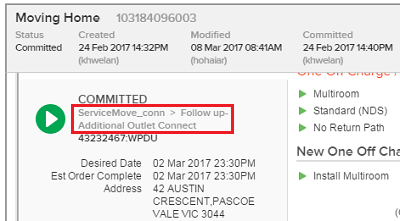
ServiceMove_conn > Follow up-Additional Outlet Connect
This work order status applies to orders where the customer has requested to move house and the connection order has stalled for one or more of the multiroom set top units. This is a stalled order.
What needs to be done?
VST will need to intervene and fix it. For transfer information, see FoxPages directory - general information and specialist support.
What is the impact if it's not fixed?
The customer will not be able to use or view any channels on the affected STBs until the order is completed.
3.5 Replace the Inventory placeholders
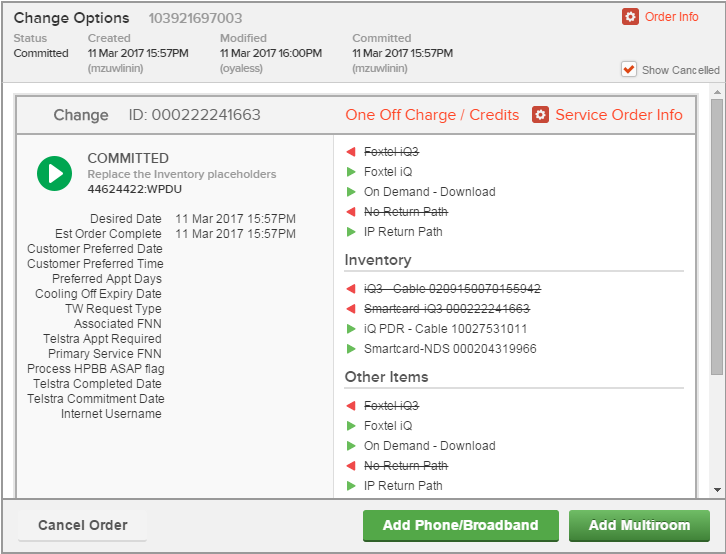
This work order status applies to orders where we've assigned inventory to an order like a DIY or SIK and the order has not closed like normal. This is a stalled order.
What needs to be done?
Attempt to resolve it with Worklist Handler (see Procedure - restart workflow in Worklist Handler). If this does not resolve the issue, VST will need to intervene and fix it. For transfer information, see FoxPages directory - general information and specialist support.
What is the impact if it is not fixed?
The customer will not be able to use or view any channels on their new STB.
3.6 SOC - Subprocess - Fix SOC
This work order status applies to orders where an account level change has not completed and is preventing other parts of the order from closing.
What needs to be done?
Attempt to resolve it with Worklist Handler (see Procedure - restart workflow in Worklist Handler). If this does not resolve the issue, VST will need to intervene and fix it. For transfer information, see FoxPages directory - general information and specialist support.
What is the impact if it's not fixed?
The customer will not be able to use or view any channel changes that are part of the order or orders booked after.
Top
4. Work order status - locked
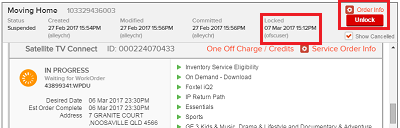
When there is an open order on an account, the order locks out other people from the order while changes are being made to that order.
What can go wrong?
An order can stay locked accidentally even if the original user has finished making changes. While it's locked the order will not progress through to completion.
What is the impact if this is not fixed?
Any change that is meant to occur on the order will not happen.
Who can unlock it?
Anyone who can see the Unlock button in CORE. Please make sure that the user who locked it has finished doing what they need to before attempting this.
Top
This work order status applies to orders where the customer has requested an inventory change, for example an upgrade to an iQ3 or a DIY swap. This is a stalled order.
What needs to be done?
VST will need to intervene and fix it. For transfer information, see FoxPages directory - general information and specialist support.
What is the impact if it's not fixed?
The customer will not be able to use or view any channels on their new STB.
3.2 Change_servicenetwork
This work order status applies to orders where a customer has requested a change to their service, such as adding the Sports package. This is a stalled order.
What needs to be done?
VST will need to intervene and fix it. For transfer information, see FoxPages directory - general information and specialist support.
What is the impact if it's not fixed?
The customer will not be able to view the channels they have asked to upgrade to or may continue to be charged for a package they no longer wish to subscribe to.
3.3 Connect Network Message
This work order status applies to orders where the customer is connecting a set top unit, for example adding a multiroom or a new customer connection. This is a stalled order.
What needs to be done?
VST will need to intervene and fix it. For transfer information, see FoxPages directory - general information and specialist support.
What is the impact if it's not fixed?
The customer will not be able to use or view channels on their new iQ3 multiroom.
3.4 ServiceMove_conn
ServiceMove_conn > Follow up-Connect AI Failure
This work order status applies to orders where the customer is moving house. This is a stalled order.
What needs to be done?
VST will need to intervene and fix it. For transfer information, see FoxPages directory - general information and specialist support.
What is the impact if it's not fixed?
The customer will not be able to use or view any channels on the STB in the affected service order(s) until they have completed, this means the customer will not be able to watch their Foxtel at the new address they've moved to.
ServiceMove_conn > Follow up-Additional Outlet Connect
This work order status applies to orders where the customer has requested to move house and the connection order has stalled for one or more of the multiroom set top units. This is a stalled order.
What needs to be done?
VST will need to intervene and fix it. For transfer information, see FoxPages directory - general information and specialist support.
What is the impact if it's not fixed?
The customer will not be able to use or view any channels on the affected STBs until the order is completed.
3.5 Replace the Inventory placeholders
This work order status applies to orders where we've assigned inventory to an order like a DIY or SIK and the order has not closed like normal. This is a stalled order.
What needs to be done?
Attempt to resolve it with Worklist Handler (see Procedure - restart workflow in Worklist Handler). If this does not resolve the issue, VST will need to intervene and fix it. For transfer information, see FoxPages directory - general information and specialist support.
What is the impact if it is not fixed?
The customer will not be able to use or view any channels on their new STB.
3.6 SOC - Subprocess - Fix SOC
This work order status applies to orders where an account level change has not completed and is preventing other parts of the order from closing.
What needs to be done?
Attempt to resolve it with Worklist Handler (see Procedure - restart workflow in Worklist Handler). If this does not resolve the issue, VST will need to intervene and fix it. For transfer information, see FoxPages directory - general information and specialist support.
What is the impact if it's not fixed?
The customer will not be able to use or view any channel changes that are part of the order or orders booked after.
Top
4. Work order status - locked
When there is an open order on an account, the order locks out other people from the order while changes are being made to that order.
What can go wrong?
An order can stay locked accidentally even if the original user has finished making changes. While it's locked the order will not progress through to completion.
What is the impact if this is not fixed?
Any change that is meant to occur on the order will not happen.
Who can unlock it?
Anyone who can see the Unlock button in CORE. Please make sure that the user who locked it has finished doing what they need to before attempting this.
Top